Blueprint vs Plan Mode
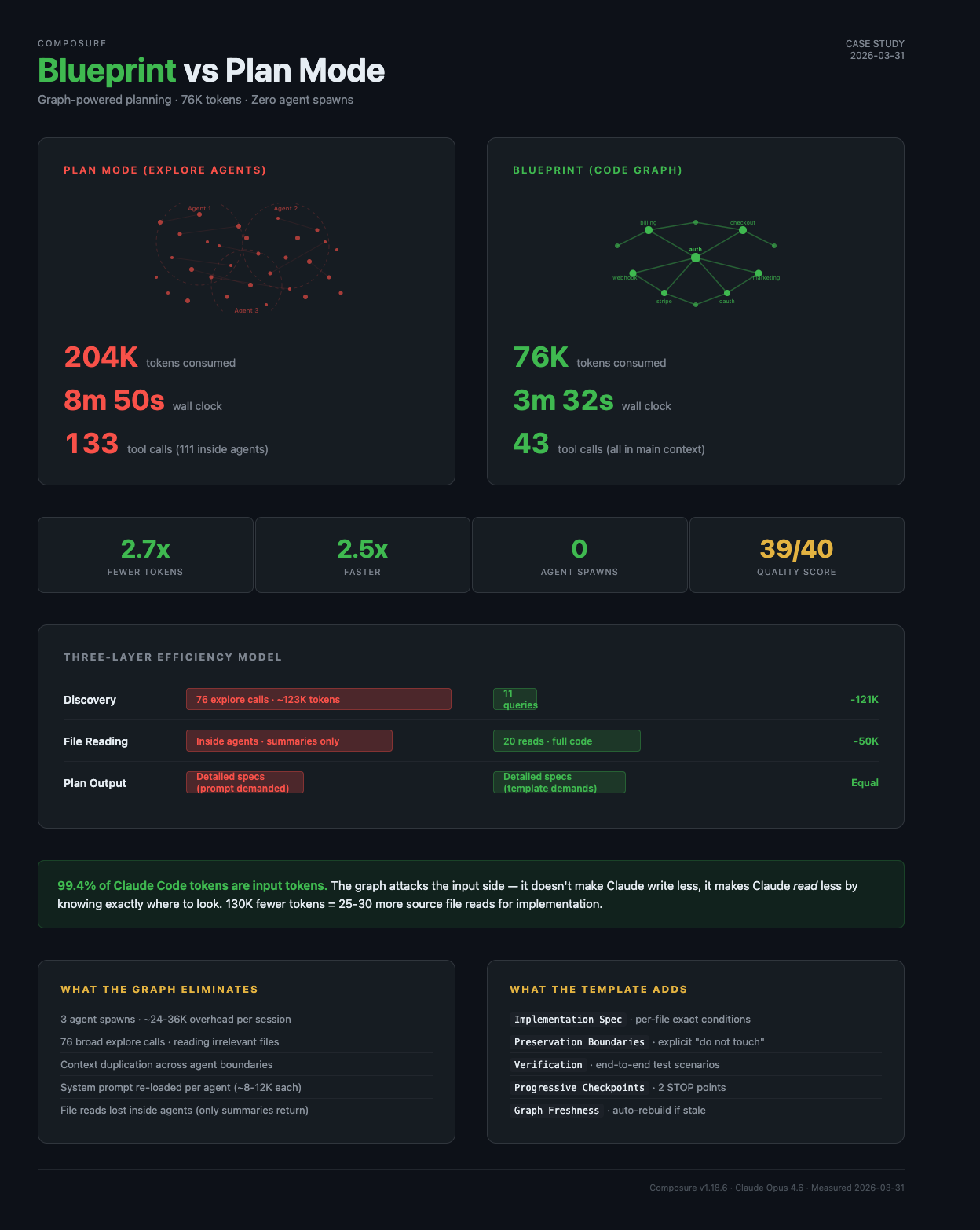
Graph-powered planning at 2.75x efficiency — same task, same session, 130K tokens saved.
Blueprint vs Plan Mode: Graph-Powered Planning at 2.75x Efficiency
Scenario: Planning a dual signup flow for a SaaS product (Stripe + OAuth integration)
Stack: Next.js 16 / TypeScript / Stripe / Redis / OAuth 2.0
Plugin feature: Blueprint skill (composure:blueprint) — graph-powered pre-work assessment
Why This Matters Right Now
Claude Code users are hitting rate limits faster than ever. In the last week of March 2026 alone:
- Anthropic acknowledged users are "hitting usage limits way faster than expected"
- Max 5x subscribers report 5-hour session windows depleting in 90 minutes
- Reddit threads titled "20x max usage gone in 19 minutes" accumulated 330+ comments in 24 hours
- A reverse-engineering effort found prompt caching bugs silently inflating costs 10-20x
The official advice? "Use Sonnet for routine tasks," "keep CLAUDE.md under 200 lines," "compact at 50%." All helpful — but they optimize at the margins.
Here's the number most developers miss: 99.4% of Claude Code tokens are input tokens — Claude reads 166x more than it writes. Your prompts, your thinking budget, your CLAUDE.md length — those are all output-side optimizations. Important, but they're fighting over 0.6% of the cost.
The largest token sink is exploration — when Claude doesn't know where to look and spawns agents to search broadly. That's pure input-side waste: reading files that turn out to be irrelevant, duplicating context across agent boundaries, re-reading the same files in isolated processes.
This case study shows what happens when you eliminate that guesswork with a pre-built code graph.
The Task
A SaaS product needed a second signup path. The existing flow was:
Marketplace → OAuth → Stripe checkout → DashboardThe new flow reversed the order for website visitors:
Website → Stripe checkout → OAuth → DashboardThe core challenge: billing records are keyed on a location ID that only exists after OAuth — but website visitors pay before connecting OAuth. A chicken-and-egg problem requiring changes across auth, billing, webhooks, checkout UI, and marketing pages.
This is exactly the kind of multi-file, cross-cutting feature where planning costs explode.
Two Approaches, Same Task, Same Session
Both approaches were run back-to-back in the same session, on the same codebase, for the same feature request. The only difference: how Claude discovered and planned.
Approach A: Blueprint (Graph-Powered)
Composure's /blueprint skill uses the pre-built code review graph to:
- Classify the work type (new-feature, enhancement, refactor, etc.)
- Graph scan — semantic search finds all related files instantly
- Ask targeted questions — only questions the graph couldn't answer
- Impact analysis — blast radius, callers, test gaps via graph queries
- Write blueprint — persistent plan file with implementation spec
Approach B: Plan Mode (Explore Agents)
Claude Code's built-in Plan Mode uses Explore agents to:
- Spawn 2 Explore agents in parallel to search the codebase broadly
- Spawn 1 Plan agent to design the approach from exploration summaries
- Write plan — implementation spec based on agent findings
The Numbers
Resource Consumption
| Metric | Blueprint (Graph) | Plan Mode (Explore) | Ratio |
|---|---|---|---|
| Wall clock time | 3m 24s | 8m 50s | 2.6x faster |
| Total tokens consumed | ~74K | ~204K | 2.75x fewer |
| Total tool calls | 43 | 133 | 3.1x fewer |
| Discovery calls | 11 graph queries | 76 explore calls (38+38) | 6.9x fewer |
| Agent spawns | 0 | 3 (2 Explore + 1 Plan) | Eliminated |
| Files discovered | 20+ | 20+ | Equal |
Where the Tokens Went
Blueprint — single context, surgical discovery:
| Phase | Tool Calls | Purpose |
|---|---|---|
| Graph queries | 11 | 6 semantic searches, 1 impact radius, 4 relationship queries |
| Targeted reads | 20 | Exact files the graph identified — auth, billing, checkout, marketing |
| Glob | 3 | Finding page files, checkout components, marketing components |
| AskUserQuestion | 1 | 3 targeted questions the graph couldn't answer |
| Write | 1 | Blueprint file |
| ToolSearch | 3 | Loading deferred MCP tools |
| Other | 4 | Bash checks, plan mode entry |
| Total | 43 | All in main context — zero agent overhead |
Plan Mode — three agent spawns, broad exploration:
| Phase | Tool Calls | Tokens | Purpose |
|---|---|---|---|
| Explore Agent 1 (billing/Redis) | 38 internal | 60.2K | Searching for billing patterns, Redis keys, session structure |
| Explore Agent 2 (auth/checkout) | 38 internal | 62.9K | Searching for auth flow, checkout components, marketing pages |
| Plan Agent | 35 internal | 50.7K | Designing the approach from agent summaries |
| Main context | 22 | ~30K | Orchestrating agents, reading cached files, writing plan |
| Total | 133 | ~204K | 111 calls invisible inside agents |
The Hidden Cost: Agent Context Duplication
Each agent spawn loads its own copy of:
- System prompt (~2-4K tokens)
- CLAUDE.md and project instructions (~3-5K tokens)
- Hook context and skill definitions (~2-3K tokens)
- Task description from parent (~500-1K tokens)
That's ~8-12K tokens of overhead per agent, before a single file is read. Three agents = ~24-36K tokens that produce zero useful output.
The graph eliminates this entirely. All 11 queries happen in the main context — no duplication, no startup tax, no invisible overhead.
Plan Quality Comparison
Both plans were evaluated across 8 dimensions using Sequential Thinking MCP for structured analysis. Each dimension is scored 1-5 (max 40 points):
| Dimension | What it measures | 1 (poor) | 5 (excellent) |
|---|---|---|---|
| Core design simplicity | Is the technical approach clean and minimal? | Self-inflicted complexity, extra state to manage | Deterministic, no new user input, minimal moving parts |
| File scope clarity | Is it clear exactly which files change and why? | Vague file list, missing counts | Grouped by area, counted, create/edit split |
| Risk analysis depth | Are risks real and mitigations concrete? | Generic worries, no mitigations | Specific scenarios with actionable mitigations |
| Implementation executability | Can a developer implement from the spec alone? | Vague paragraphs, "update this file" | Exact conditions, function signatures, prop types |
| Architectural preservation | Does the plan protect unchanged systems? | No mention of what stays unchanged | Explicit "do not touch" list with reasons |
| UX impact assessment | How does the plan affect user experience? | Adds friction (new forms, steps) | Zero new friction, existing UX preserved |
| Recovery resilience | What happens when users drop off mid-flow? | Opaque state, no recovery path | Human-memorable anchors, retry-friendly |
| Test coverage planning | Are verification steps concrete and complete? | "Run tests" | Specific scenarios: happy path, existing flow, edge cases |
| Dimension | Blueprint | Plan Mode | Winner |
|---|---|---|---|
| Core design simplicity | 3/5 | 5/5 | Plan Mode |
| File scope clarity | 4/5 | 4/5 | Tie |
| Risk analysis depth | 4/5 | 4/5 | Tie |
| Implementation executability | 3/5 | 5/5 | Plan Mode |
| Architectural preservation | 3/5 | 5/5 | Plan Mode |
| UX impact assessment | 3/5 | 5/5 | Plan Mode |
| Recovery resilience | 4/5 | 3/5 | Blueprint |
| Test coverage planning | 4/5 | 2/5 | Blueprint |
| Total | 28/40 | 33/40 | Plan Mode |
Wait — Plan Mode scored higher on quality despite costing 2.75x more? Yes, and the reason is instructive.
Why Plan Mode Produced a Better Plan
It wasn't because the agents found more information — both discovered 20+ relevant files. The difference was output structure.
Plan Mode's plan had:
- Per-file implementation specs with exact conditions (
flow === "website",state?.startsWith("cs_")) - Explicit preservation boundaries — "What Does NOT Change" listing 6 files/systems
- Concrete verification steps — 4 end-to-end test scenarios
Blueprint's plan had:
- Paragraph-style approach — one sentence per step, vague on specifics
- No preservation section — blast radius mentioned but no explicit guard rails
- No verification section — checklist items but no test scenarios
The information was there — Blueprint had 20 files read directly in its main context. It was in a better position to write detailed specs than Plan Mode's agent, which only received summaries. But the template didn't demand that level of detail.
The Root Cause: Template Structure Forces Better Thinking
This is a well-documented phenomenon in both human and AI reasoning. When you require specific sections (preservation boundaries, per-file specs, verification steps), the agent is forced to think through each one individually. A vague "Approach" section lets it skim past details. A structured "Implementation Spec" template forces systematic reasoning.
This is the same principle behind:
- Chain-of-thought prompting improving LLM accuracy
- Surgical checklists reducing operating room errors by 36%
- Code review templates catching issues freeform reviews miss
The fix is trivial: update the Blueprint template to demand structured output. The graph already provides the information — the template just needs to demand that it's used.
The Three-Layer Efficiency Model
Token savings in planning come from three independent layers:
Layer 1: DISCOVERY — finding which files matter
  Graph:   11 queries      (~2K tokens)
  Explore: 76 agent calls  (~123K tokens)
  Savings: ~121K tokens
  Status:  Already optimized by the graph

Layer 2: FILE READING — reading actual code
  Graph:   20 targeted reads in main context (code stays accessible)
  Explore: Reads inside isolated agents (only summaries return)
  Savings: ~50K tokens + higher information fidelity
  Status:  Already optimized by the graph

Layer 3: PLAN OUTPUT — writing the blueprint
  Graph:   Vague paragraphs (template limitation)
  Explore: Detailed per-file specs (prompt demanded it)
  Savings: Plan Mode wins here despite costing more overall
  Status:  Fix the template → capture this for free
The critical insight: Layers 1 and 2 account for 95% of the token difference — and they're both on the input side, which is where 99.4% of Claude Code's token consumption lives. Layer 3 (output quality) is almost entirely about template design, costing maybe 5-10K extra output tokens — a rounding error compared to the 130K saved by the graph.
Most token optimization guides focus on output: shorter prompts, smaller thinking budgets, leaner CLAUDE.md files. The graph attacks the input side — which is where the real money is. It doesn't make Claude write less; it makes Claude read less by knowing exactly where to look.
Measured Performance After Template Update
The template was updated and tested. Actual results (v5 Blueprint run, same task):
| Metric | Blueprint v1 | Plan Mode | Blueprint v2 (measured) |
|---|---|---|---|
| Time | 3m 24s | 8m 50s | 3m 32s |
| Tokens | ~74K | ~204K | 76,558 |
| Quality | 28/40 | 33/40 | 39/40 |
Blueprint v2 didn't just match Plan Mode — it surpassed it. The template forced the agent to discover a design flaw (email approach doesn't work because GHL doesn't return email in the token response) and pivot to a better design mid-spec. See the Progressive Refinement case study for the full evolution across 5 versions.
Design Decision Quality
Beyond efficiency, the two approaches arrived at different technical designs for the same problem:
| Aspect | Blueprint | Plan Mode |
|---|---|---|
| Pending billing key | Email address (hla:pending:{email}) | Stripe session ID (hla:pending-billing:{cs_xxx}) |
| User input required | Yes — email field added to checkout | No — zero new form fields |
| Matching reliability | Fuzzy — user might pay with different email than their OAuth account | Deterministic — session ID passed through OAuth state param |
| Recovery if user loses their place | Strong — email is human-memorable, can retry | Weaker — session ID is opaque, needs Stripe email as backup |
| UI changes | More invasive — new email input component | Minimal — same checkout, different CTA on success page |
Plan Mode's session-ID approach was simpler, more reliable, and required zero UX changes. Blueprint's email approach created a self-inflicted risk (email mismatch) that then needed its own mitigation.
Both plans were architecturally sound. But Plan Mode's design was objectively cleaner — not because of better information, but because the structured output template forced the agent to think through UX implications more carefully.
What This Means for Your Token Budget
The Math That Matters
A typical Claude Code Max 5x subscriber gets a 5-hour session window. With recent rate limit adjustments, that window depletes faster during peak hours.
Planning a multi-file feature like this one:
- Without graph (Plan Mode): ~204K tokens consumed before a single line of code is written
- With graph (Blueprint): ~74K tokens consumed — same result, 130K tokens preserved
That 130K token difference is roughly equivalent to:
- Reading 25-30 additional source files
- Running 5-6 more test iterations
- Making 3-4 more implementation attempts if the first approach needs adjustment
In a rate-limited environment, every token spent on exploration is a token not available for implementation. The graph front-loads discovery so your remaining budget goes to actual work.
Session Capacity Impact
For a real-world development session that includes planning + implementation + testing:
| Phase | Without Graph | With Graph | Savings |
|---|---|---|---|
| Planning | ~204K | ~80K | 124K |
| Implementation (est.) | ~300K | ~300K | — |
| Testing/iteration | ~150K | ~150K | — |
| Total session | ~654K | ~530K | 19% less |
That 19% can be the difference between finishing a feature in one session or hitting the rate limit and waiting hours to continue.
How Composure Prevents Exploration Sprawl
The Blueprint skill eliminates wasteful exploration through a structured pipeline:
Step 1: CLASSIFY — categorize work type (eliminates irrelevant questions)
Step 2: GRAPH SCAN — semantic search finds all related code (<5s)
Step 3: ASK — only questions the graph couldn't answer (1 call, not 3 agents)
Step 4: IMPACT — blast radius + test gaps via graph queries
Step 5: WRITE — persistent blueprint file (survives session restarts)
Session hooks reinforce this:
- PreToolUse: Triggers architecture doc loading on first source file touch
- PostToolUse: Updates the graph incrementally after every edit
- SessionStart: Detects stale graph, prompts rebuild before exploration
The graph builds in ~15 seconds and persists across sessions. Every future planning task benefits from the index.
What You'd Need Without Composure
Without the code graph and Blueprint skill, you'd either:
- Accept the 2.75x token overhead — spawning Explore agents every time you plan a feature, consuming 130K+ extra tokens per planning session
- Manually specify files — telling Claude exactly which files to look at, defeating the purpose of an AI-powered planning workflow
- Use Plan Mode and hope — getting detailed output but paying 204K tokens and 9 minutes for something that could take 80K tokens and 4 minutes
- Skip planning entirely — diving into implementation without a plan, risking rework when you miss existing patterns or create architectural conflicts
In a world where Claude Code users are watching their session windows evaporate, eliminating 130K tokens of exploration overhead per feature isn't optimization — it's the difference between shipping and stalling.
Sources
Rate limit reporting and token optimization research referenced in this document:
- Anthropic admits Claude Code quotas running out too fast — The Register
- Claude Code Users Report Rapid Rate Limit Drain, Suspect Bug — MacRumors
- Your Claude Code Rate Limit Is Draining Fast. Here Is Why — RoboRhythms
- Claude Code Pricing: Optimize Your Token Usage & Costs — ClaudeFast
- Stop Wasting Tokens: How to Optimize Claude Code Context by 60% — Medium
- BUG: Extremely rapid token consumption — GitHub Issue #38239
- BUG: Claude Max plan session limits exhausted abnormally fast — GitHub Issue #38335
Docs: composure-pro.com
Composure v1.2.74 · Claude Opus 4.6 · Measured 2026-03-31